P3
P3
Testsuite name: Deployment
Product(s) tested: JRE 7u10 b17 (x86)
OS/architecture: Windows 7 (x64)
Reproducible: Always
Reproducible on machine: my machine (Windows 7 x 64)
Also reproducible on machine: stt-134
Is it a Regression: No
Is it a platform specific issue: No
Steps to reproduce:
1. install 7u10 b17
2. move the time forward for 5 years
3. run some jnlp from WebStart via command line (for example, http://bugster.central.sun.com/bugster.jnlp)
3. choose "block" (checkbox doesn't checked)
4. run this jnlp a few more times
Result:
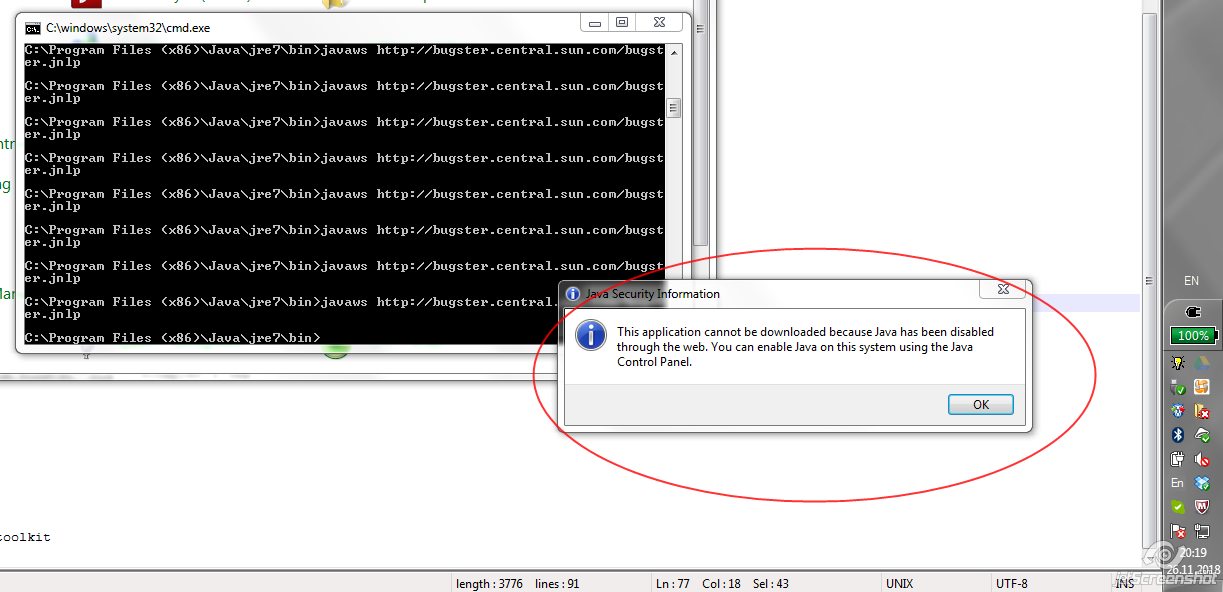
1. next some times show Java Security Information window (see attachmed image)
2. Expired dialog appears again
Expected that Java Security Information window will always appears (as on 7u10 b14) or Expired dialog will always appears.
Product(s) tested: JRE 7u10 b17 (x86)
OS/architecture: Windows 7 (x64)
Reproducible: Always
Reproducible on machine: my machine (Windows 7 x 64)
Also reproducible on machine: stt-134
Is it a Regression: No
Is it a platform specific issue: No
Steps to reproduce:
1. install 7u10 b17
2. move the time forward for 5 years
3. run some jnlp from WebStart via command line (for example, http://bugster.central.sun.com/bugster.jnlp)
3. choose "block" (checkbox doesn't checked)
4. run this jnlp a few more times
Result:
1. next some times show Java Security Information window (see attachmed image)
2. Expired dialog appears again
Expected that Java Security Information window will always appears (as on 7u10 b14) or Expired dialog will always appears.