-
Type:
Bug
-
Resolution: Cannot Reproduce
-
Priority:
 P4
P4
-
Affects Version/s: 7
-
Component/s: deploy
-
Environment:
Jre7u21b06+32bit+Solaris 10 x86+FF17+32bit
-
generic
-
generic
Component: common
Bundle: Jre7u21b06+32bit
Platform: Solaris 10 x86
Steps:(this test case is from 8/deployment2/new_framework/tests/common/manual/disableJavaManual_NonMultipleJRE/testcases/disableJavaManual_NonMultipleJREScenarios/testDowngradeUnawareUninstallDisable.html)
1.Install test JRE ( it should supports "Enable Java" feature )
2.Set "EnableJava" feature to OFF
3.Uninstall test JRE
4.Install an older JRE which is "EnableJava" feature unaware (Any 7uX JRE earlier than 7u10 is this feature unaware)
5.(ONLY apply to JDK 8 and JDK7 version 7u11 and later: Before applets/javaws applications get launched, a security warning dialog will pop-up asking you if you want to run the application. Click "Run" to accept. NOTE: This is NOT a cert dialog)
6.Run sample applets and make sure that it's loaded fine:
http://localhost:8080/disableJavaManual_NonMultipleJRE/html/testAppletWithAppletTag.html
The actual result:
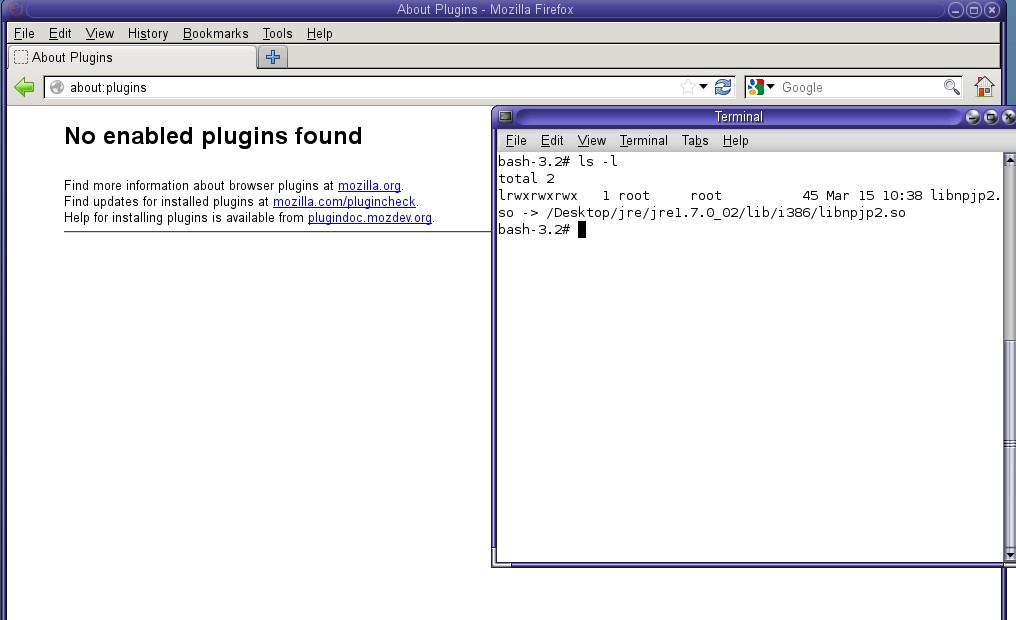
at step 4, after installing older JRE, we need to make a soft link(the old jre) to FF/plugins, but after doing that, it does not work: if we input "about:plugins" in FF, jre information does not display.Please refer to 3.jpg
Bundle: Jre7u21b06+32bit
Platform: Solaris 10 x86
Steps:(this test case is from 8/deployment2/new_framework/tests/common/manual/disableJavaManual_NonMultipleJRE/testcases/disableJavaManual_NonMultipleJREScenarios/testDowngradeUnawareUninstallDisable.html)
1.Install test JRE ( it should supports "Enable Java" feature )
2.Set "EnableJava" feature to OFF
3.Uninstall test JRE
4.Install an older JRE which is "EnableJava" feature unaware (Any 7uX JRE earlier than 7u10 is this feature unaware)
5.(ONLY apply to JDK 8 and JDK7 version 7u11 and later: Before applets/javaws applications get launched, a security warning dialog will pop-up asking you if you want to run the application. Click "Run" to accept. NOTE: This is NOT a cert dialog)
6.Run sample applets and make sure that it's loaded fine:
http://localhost:8080/disableJavaManual_NonMultipleJRE/html/testAppletWithAppletTag.html
The actual result:
at step 4, after installing older JRE, we need to make a soft link(the old jre) to FF/plugins, but after doing that, it does not work: if we input "about:plugins" in FF, jre information does not display.Please refer to 3.jpg