P5
P5
Testsuite:ExtensionNoNetwork in javaws
Test name(s):ExtensionNoNetworkScenarios/testExtensionNoNetwork.html
Product(s) tested:Jre9b40/64bit
OS/architecture:ubuntu12.04-x64
Reproducible: Always
Reproducible on machine:egtc
Is it a Regression:Not sure
Test result on the last GAed release for this train:
[if Fail] Test result on FCS:
Is it a platform specific issue:
Exception/Error from Log:
http://scaaa008.us.oracle.com:9502/runs%2F647260.ManualSubmit-1/ExtensionNoNetworkScenarios/testExtensionNoNetwork.jtr
Copy JDF workspace,install test jre,and run this case
Steps to reproduce:
1.Enable trace: in ControlPanel, Advanced tab, Debugging and Java console section, check all selections
2.In JCP, add "file:/" URL to Security->Exception Site List
3.Open JCP->Advanced-> Perform certificate revocation checks on, check "Do not check (not recommended)"
4.Disable network connection
5.Cd C:/${TOMCAT_MANUAL_HOME}/ExtensionNoNetwork/jnlp
6.Clear cache: TEST_JRE_HOME/javaws -uninstall
7.Load following app from CMD: TEST_JRE_HOME/javaws ExtensionNoNetwork.jnlp
8.An unsigned security warning dialog will pop-up. Click "Run" to accept
9.There will be a security waring dialog shown up. Click "Install".
10.If the hello world app is loaded successfully, then test pass. Otherwise set it as fail
The actual result:
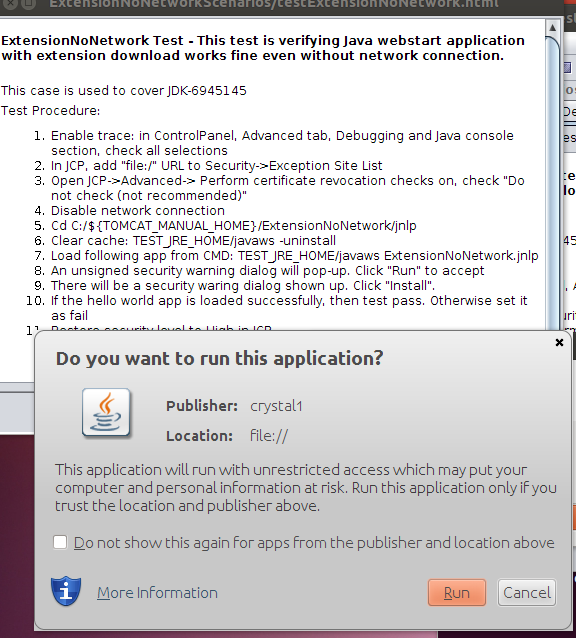
There is Run button instead of install on security warning window.Please refer to attachment.png.
INTJDK-7614087 needs to be resolved in jdk9 ws.
Test name(s):ExtensionNoNetworkScenarios/testExtensionNoNetwork.html
Product(s) tested:Jre9b40/64bit
OS/architecture:ubuntu12.04-x64
Reproducible: Always
Reproducible on machine:egtc
Is it a Regression:Not sure
Test result on the last GAed release for this train:
[if Fail] Test result on FCS:
Is it a platform specific issue:
Exception/Error from Log:
http://scaaa008.us.oracle.com:9502/runs%2F647260.ManualSubmit-1/ExtensionNoNetworkScenarios/testExtensionNoNetwork.jtr
Copy JDF workspace,install test jre,and run this case
Steps to reproduce:
1.Enable trace: in ControlPanel, Advanced tab, Debugging and Java console section, check all selections
2.In JCP, add "file:/" URL to Security->Exception Site List
3.Open JCP->Advanced-> Perform certificate revocation checks on, check "Do not check (not recommended)"
4.Disable network connection
5.Cd C:/${TOMCAT_MANUAL_HOME}/ExtensionNoNetwork/jnlp
6.Clear cache: TEST_JRE_HOME/javaws -uninstall
7.Load following app from CMD: TEST_JRE_HOME/javaws ExtensionNoNetwork.jnlp
8.An unsigned security warning dialog will pop-up. Click "Run" to accept
9.There will be a security waring dialog shown up. Click "Install".
10.If the hello world app is loaded successfully, then test pass. Otherwise set it as fail
The actual result:
There is Run button instead of install on security warning window.Please refer to attachment.png.
INTJDK-7614087 needs to be resolved in jdk9 ws.