P3
P3
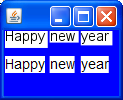
The example demonstrates Text and SwingLabel components that display identical text but look differently. Aside from anti-aliasing differences, they have different boundaries:
1. The height of Text varies depending on the characters displayed, SwingLabel has a fixed height
2. Text has some extra space on the right, SwingLabel doesn't
3. Text has some padding under the text, SwingLabel has even paddings over and under the text.
This is a serious issue because it makes it necessary to specify hard-coded text height in most cases.
Example script:
------------------------------------------
package bugs;
import javafx.ext.swing.SwingLabel;
import javafx.scene.CustomNode;
import javafx.scene.Group;
import javafx.scene.layout.VBox;
import javafx.scene.layout.HBox;
import javafx.scene.Node;
import javafx.scene.paint.Color;
import javafx.scene.Scene;
import javafx.scene.shape.Rectangle;
import javafx.scene.text.Font;
import javafx.scene.text.Text;
import javafx.scene.text.TextOrigin;
import javafx.stage.Stage;
class Panel extends CustomNode {
public var content: Node;
var decor: Node = Rectangle {
width: bind content.boundsInParent.width as Number;
height: bind content.boundsInParent.height as Number;
fill: Color.WHITE
}
override function create(): Node {
Group {
content: [decor,
Group {
content: this.content;
}]
}
}
}
def words = ["Happy", "new", "year"];
def myFont = Font {
size: 14
name: "Arial"
};
Stage {
width: 120
height: 100
scene: Scene {
content: Group {
content: [
Rectangle {
fill: Color.BLUE
width: 120
height: 100
}
HBox {
translateX: 1
translateY: 1
spacing: 1
content:
for(w in words) {
Group {
content: [
Panel {
content: Text {
content: w
textOrigin: TextOrigin.TOP
font: myFont
}
}
Panel {
translateY: 25
content: SwingLabel {
text: w
font: myFont
}
}
]
}
}
}
]
}
}
}
------------------------------------------
The screenshot is attached.
1. The height of Text varies depending on the characters displayed, SwingLabel has a fixed height
2. Text has some extra space on the right, SwingLabel doesn't
3. Text has some padding under the text, SwingLabel has even paddings over and under the text.
This is a serious issue because it makes it necessary to specify hard-coded text height in most cases.
Example script:
------------------------------------------
package bugs;
import javafx.ext.swing.SwingLabel;
import javafx.scene.CustomNode;
import javafx.scene.Group;
import javafx.scene.layout.VBox;
import javafx.scene.layout.HBox;
import javafx.scene.Node;
import javafx.scene.paint.Color;
import javafx.scene.Scene;
import javafx.scene.shape.Rectangle;
import javafx.scene.text.Font;
import javafx.scene.text.Text;
import javafx.scene.text.TextOrigin;
import javafx.stage.Stage;
class Panel extends CustomNode {
public var content: Node;
var decor: Node = Rectangle {
width: bind content.boundsInParent.width as Number;
height: bind content.boundsInParent.height as Number;
fill: Color.WHITE
}
override function create(): Node {
Group {
content: [decor,
Group {
content: this.content;
}]
}
}
}
def words = ["Happy", "new", "year"];
def myFont = Font {
size: 14
name: "Arial"
};
Stage {
width: 120
height: 100
scene: Scene {
content: Group {
content: [
Rectangle {
fill: Color.BLUE
width: 120
height: 100
}
HBox {
translateX: 1
translateY: 1
spacing: 1
content:
for(w in words) {
Group {
content: [
Panel {
content: Text {
content: w
textOrigin: TextOrigin.TOP
font: myFont
}
}
Panel {
translateY: 25
content: SwingLabel {
text: w
font: myFont
}
}
]
}
}
}
]
}
}
}
------------------------------------------
The screenshot is attached.