-
Type:
Bug
-
Resolution: Cannot Reproduce
-
Priority:
 P4
P4
-
Affects Version/s: fx2.0
-
Component/s: javafx
-
Environment:
java.vendor=Sun Microsystems Inc.
java.version=1.6.0_24
java.vm.vendor=Sun Microsystems Inc.
java.vm.version=19.1-b02
os.name=Windows 7
os.arch=x86
os.version=6.1JavaFX 2.0ea b18
This is a short codesample to create a Label and a TextBox:
Label labelNode = new Label(label);
GridPane.setConstraints(labelNode, 0, row);
GridPane.setHalignment(labelNode, HPos.RIGHT);
GridPane.setValignment(labelNode, VPos.BASELINE);
TextBox textNode = new TextBox();
GridPane.setConstraints(textNode, 1, row);
GridPane.setHalignment(textNode, HPos.LEFT);
GridPane.setValignment(textNode, VPos.BASELINE);
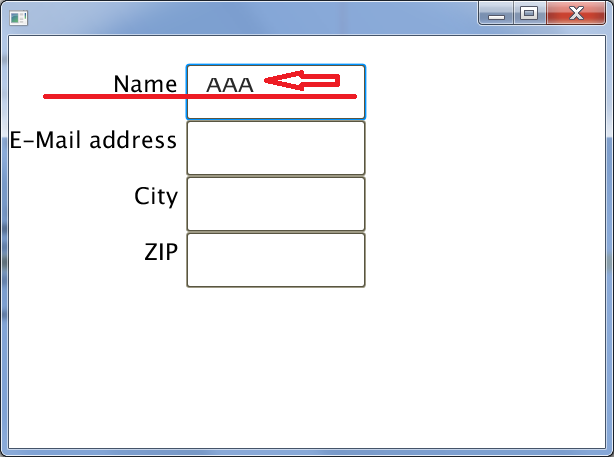
I use this code in a method to create a input form. In the attachment you can see the layout problems. The TextBox input is aligned to high on the top.
br, josh
Label labelNode = new Label(label);
GridPane.setConstraints(labelNode, 0, row);
GridPane.setHalignment(labelNode, HPos.RIGHT);
GridPane.setValignment(labelNode, VPos.BASELINE);
TextBox textNode = new TextBox();
GridPane.setConstraints(textNode, 1, row);
GridPane.setHalignment(textNode, HPos.LEFT);
GridPane.setValignment(textNode, VPos.BASELINE);
I use this code in a method to create a input form. In the attachment you can see the layout problems. The TextBox input is aligned to high on the top.
br, josh