P4
P4
I happened to install 2.1.1 SDK with 7u5, but I have reproduced it with 2.0.3 as well.
- Run the JDK installer.
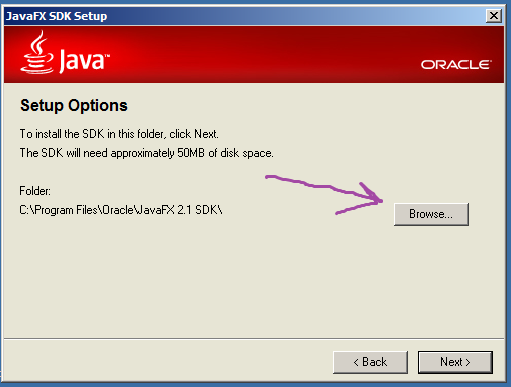
- When you get to the FX SDK, choose to Browse for a location to install. See screenshot fx1.png
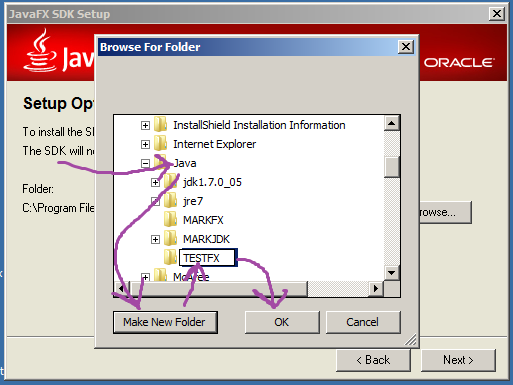
- Drill down to a non-standard directory (In my example I chose c:\Program Files\Java). Click on the directory. Click on Make New Folder. A "New Folder" appears. Click in the text box and rename it to "TESTFX". IMPORTANT: DO NOT press return or click anywhere else. After typing the letters "TESTFX", immediately click the OK button. See screenshot fx2.png
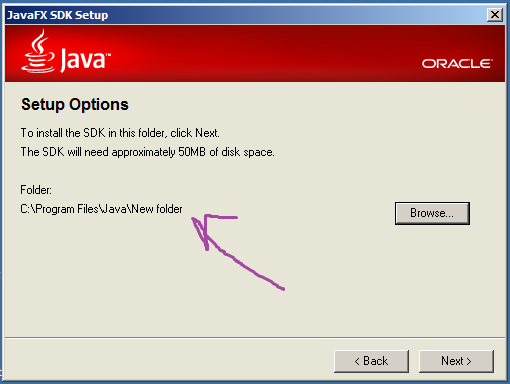
- You are taken back to the previous screen. It has your folder as "New folder". See screenshot fx3.sh
- Finish the installation
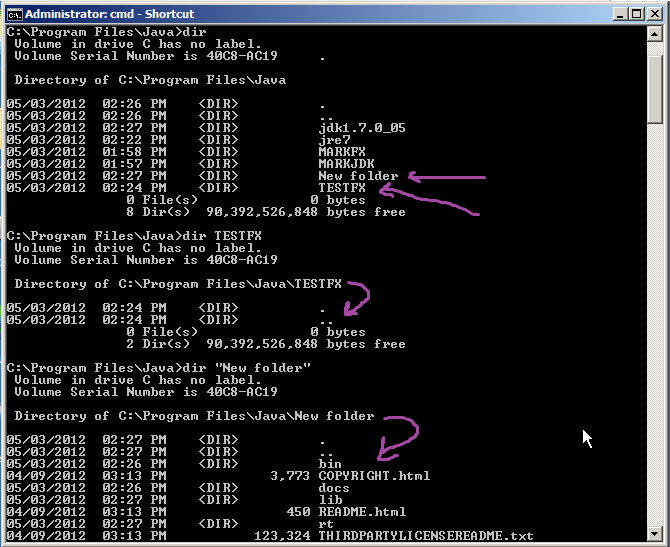
- Navigate to the install directory by explorer or command line. You will find that BOTH "TESTFX" AND "New folder" have been created. "TESTFX" is empty. The installation is in "New folder". See screenshot fx4.png.
- Run the JDK installer.
- When you get to the FX SDK, choose to Browse for a location to install. See screenshot fx1.png
- Drill down to a non-standard directory (In my example I chose c:\Program Files\Java). Click on the directory. Click on Make New Folder. A "New Folder" appears. Click in the text box and rename it to "TESTFX". IMPORTANT: DO NOT press return or click anywhere else. After typing the letters "TESTFX", immediately click the OK button. See screenshot fx2.png
- You are taken back to the previous screen. It has your folder as "New folder". See screenshot fx3.sh
- Finish the installation
- Navigate to the install directory by explorer or command line. You will find that BOTH "TESTFX" AND "New folder" have been created. "TESTFX" is empty. The installation is in "New folder". See screenshot fx4.png.