-
Type:
Bug
-
Resolution: Unresolved
-
Priority:
 P4
P4
-
Affects Version/s: jfx11, jfx17, jfx21, jfx25, jfx26
-
Component/s: javafx
-
generic
-
generic
ADDITIONAL SYSTEM INFORMATION :
Not relevant
A DESCRIPTION OF THE PROBLEM :
In the method queryAccessibleAttribute of the class Control the tooltip text is used as accessible help if the help text is not provided. This leads to accessibility bugs. Assume you have a cell with a string in it and you add a tooltip with the same text. This allows you to show the text even if it is truncated. Then the accessibility interface should handover the cell text as accessible text for a screen reader. However, because of the tooltip additionally the accessible help is set. According to accessibility norms the help text should give additional information only. Additionally a screen reader may read out the accessible text and help which means it doubles the same information.
STEPS TO FOLLOW TO REPRODUCE THE PROBLEM :
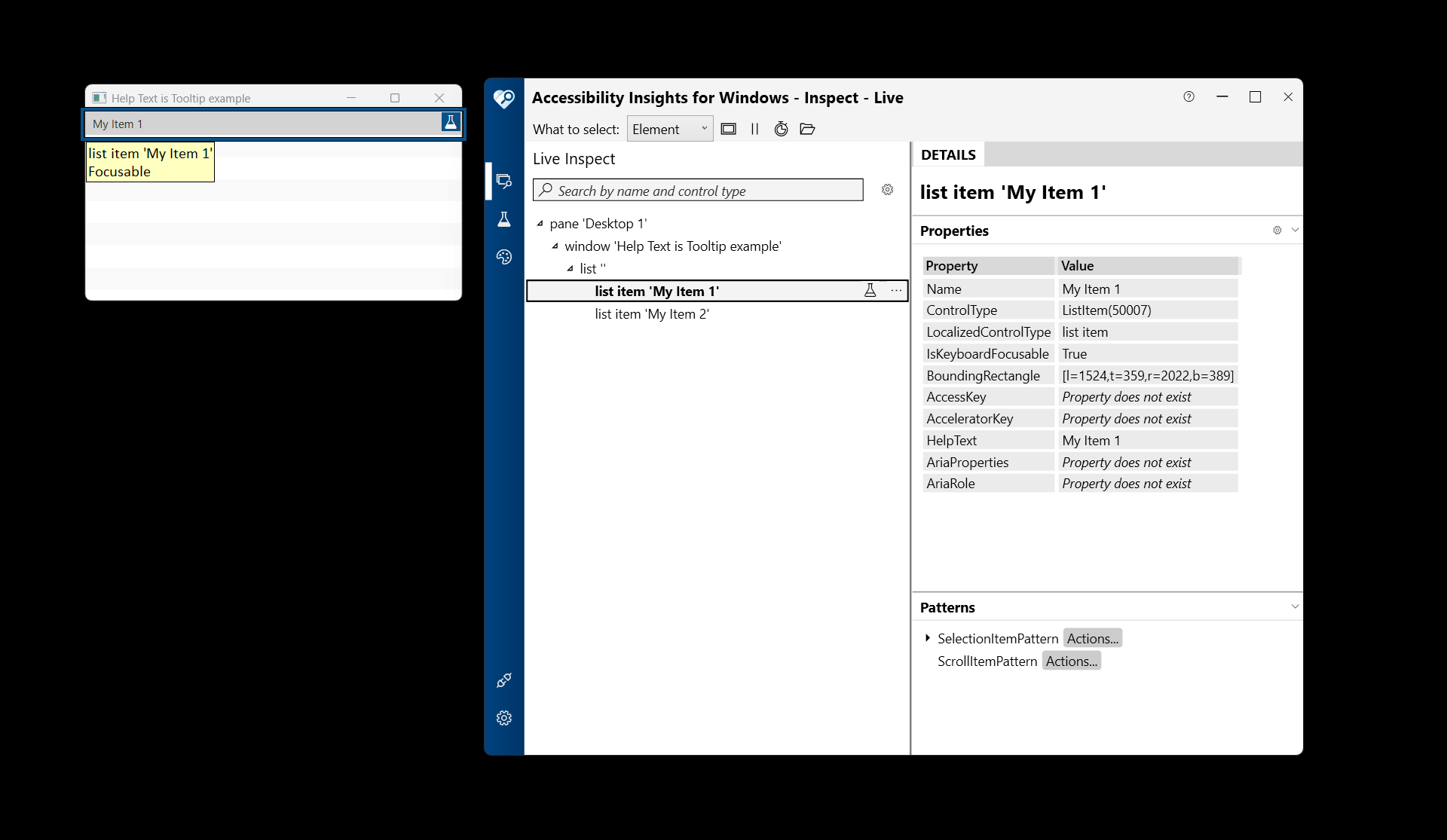
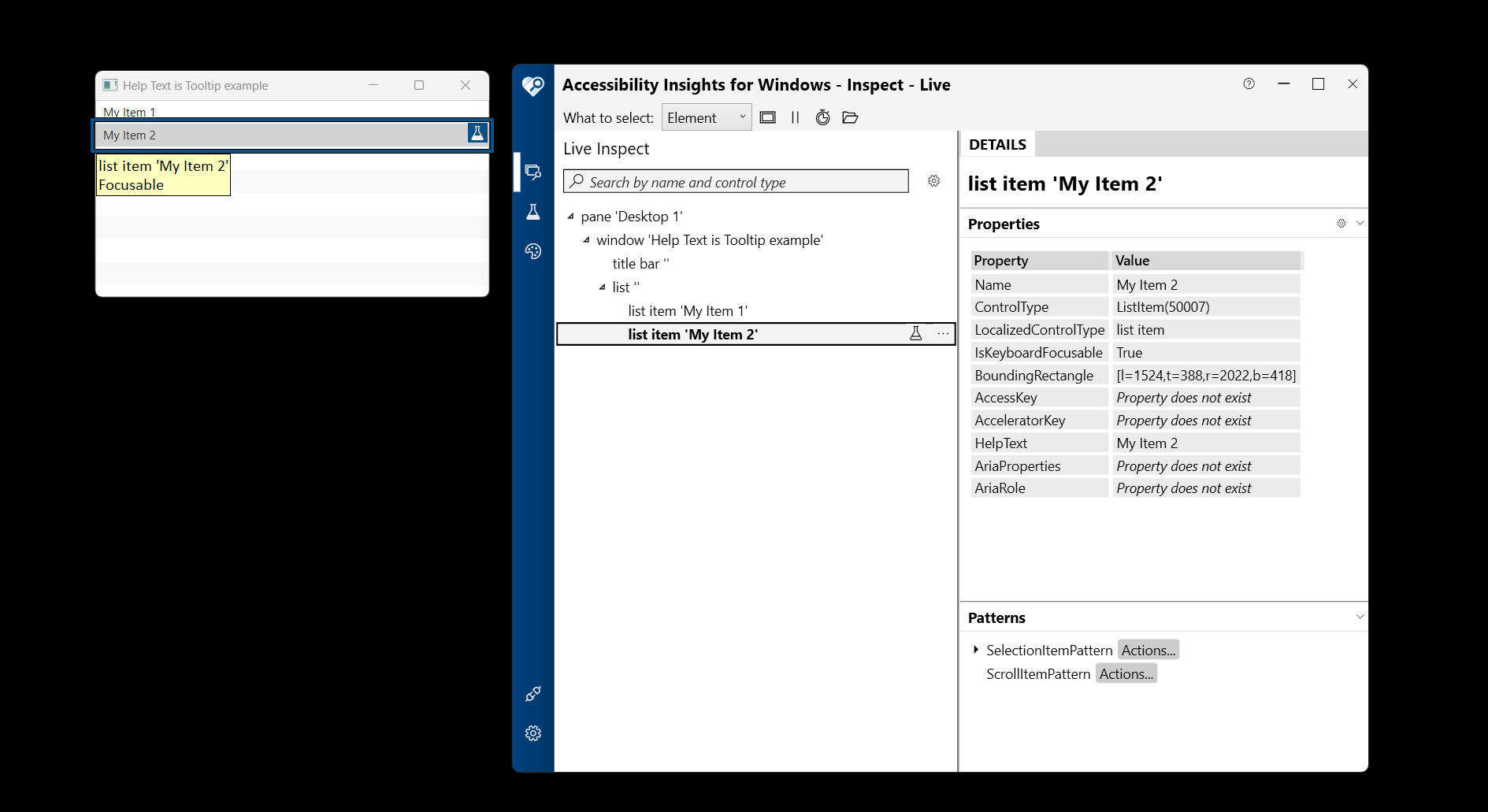
Create a ListView of Strings with an item and overwrite the cell factory to create a cell with tooltip. Then on Windows show the application and check the cell with "Accessibility Insights for Windows". The properties Name and HelpText have content even though only the Name should have content.
EXPECTED VERSUS ACTUAL BEHAVIOR :
EXPECTED -
The accessible text or in "Accessibility Insights for Windows" the property Name is set.
ACTUAL -
The accessible text and the accesible help or in "Accessibility Insights for Windows" the property Name and the HelpText are set to the same value.
---------- BEGIN SOURCE ----------
package test.javafxtest;
import javafx.application.Application;
import javafx.collections.FXCollections;
import javafx.collections.ObservableList;
import javafx.scene.Scene;
import javafx.scene.control.ListCell;
import javafx.scene.control.ListView;
import javafx.scene.control.Tooltip;
import javafx.stage.Stage;
/**
* JavaFX App
*/
public class App extends Application {
@Override
public void start(Stage primaryStage) {
ObservableList<String> items = FXCollections.observableArrayList("My Item 1", "My Item 2");
ListView<String> listView = new ListView<>(items);
listView.setCellFactory(lv -> new ListCell<String>() {
@Override
public void updateItem(String item, boolean empty) {
super.updateItem(item, empty);
setText(null);
setTooltip(null);
if (!empty) {
setText(item);
setTooltip(new Tooltip(item));
}
}
});
Scene scene = new Scene(listView, 400, 200);
primaryStage.setScene(scene);
primaryStage.setTitle("Help Text is Tooltip example");
primaryStage.show();
}
public static void main(String[] args) {
launch(args);
}
}
---------- END SOURCE ----------
Not relevant
A DESCRIPTION OF THE PROBLEM :
In the method queryAccessibleAttribute of the class Control the tooltip text is used as accessible help if the help text is not provided. This leads to accessibility bugs. Assume you have a cell with a string in it and you add a tooltip with the same text. This allows you to show the text even if it is truncated. Then the accessibility interface should handover the cell text as accessible text for a screen reader. However, because of the tooltip additionally the accessible help is set. According to accessibility norms the help text should give additional information only. Additionally a screen reader may read out the accessible text and help which means it doubles the same information.
STEPS TO FOLLOW TO REPRODUCE THE PROBLEM :
Create a ListView of Strings with an item and overwrite the cell factory to create a cell with tooltip. Then on Windows show the application and check the cell with "Accessibility Insights for Windows". The properties Name and HelpText have content even though only the Name should have content.
EXPECTED VERSUS ACTUAL BEHAVIOR :
EXPECTED -
The accessible text or in "Accessibility Insights for Windows" the property Name is set.
ACTUAL -
The accessible text and the accesible help or in "Accessibility Insights for Windows" the property Name and the HelpText are set to the same value.
---------- BEGIN SOURCE ----------
package test.javafxtest;
import javafx.application.Application;
import javafx.collections.FXCollections;
import javafx.collections.ObservableList;
import javafx.scene.Scene;
import javafx.scene.control.ListCell;
import javafx.scene.control.ListView;
import javafx.scene.control.Tooltip;
import javafx.stage.Stage;
/**
* JavaFX App
*/
public class App extends Application {
@Override
public void start(Stage primaryStage) {
ObservableList<String> items = FXCollections.observableArrayList("My Item 1", "My Item 2");
ListView<String> listView = new ListView<>(items);
listView.setCellFactory(lv -> new ListCell<String>() {
@Override
public void updateItem(String item, boolean empty) {
super.updateItem(item, empty);
setText(null);
setTooltip(null);
if (!empty) {
setText(item);
setTooltip(new Tooltip(item));
}
}
});
Scene scene = new Scene(listView, 400, 200);
primaryStage.setScene(scene);
primaryStage.setTitle("Help Text is Tooltip example");
primaryStage.show();
}
public static void main(String[] args) {
launch(args);
}
}
---------- END SOURCE ----------