P3
P3
ADDITIONAL SYSTEM INFORMATION :
Operating System: macOS 15 and later (including macOS 26)
Architecture: Apple Silicon (ARM64) and Intel (x86_64)
Java Runtime: OpenJDK 25
JavaFX Version: JavaFX built from source
A DESCRIPTION OF THE PROBLEM :
File-based font model breaks CoreText cascade and causes incorrect CJK fallback (Chinese falls back to Japanese)
Summary
On macOS, JavaFX still relies on a file-based font model, assuming that every usable font has an accessible font file (.ttf/.ttc/.otf) that can be parsed via OpenType tables. This assumption is no longer valid on modern macOS.
Starting with macOS 15 and later, many system fonts, including all system Chinese fonts, no longer exist as accessible font files. These fonts are fully integrated into CoreText and are exposed only as native system fonts with names prefixed by a dot.
As a result, JavaFX breaks CoreText’s native fallback cascade and produces incorrect CJK fallback behavior. In practice, Chinese text is rendered using Japanese fonts instead of system Chinese fonts.
⸻
Background
JavaFX currently represents fonts on macOS primarily using PrismFontFile. This design assumes that each font has a readable file path and that font initialization can parse OpenType tables such as cmap, glyf, and hmtx from that file. Glyph availability is determined by inspecting the cmap table, and fallback fonts are instantiated as file-backed font resources.
This approach works for traditional third-party fonts but is incompatible with the modern macOS system font architecture.
⸻
Changes in macOS system fonts
Beginning with macOS 15, Apple significantly changed the system font architecture. Many core system fonts, including PingFang, the only system Chinese font family, have been removed from /System/Library/Fonts. These fonts no longer provide stable or accessible file paths and cannot be safely or legally parsed by applications.
System fonts are now exposed exclusively through CoreText and appear as native fonts with names prefixed by a dot, such as .AppleSimplifiedChineseFont-Regular, .AppleTraditionalChineseFont-Regular, .AppleHongKongChineseFont-Regular, and .AppleJapaneseFont-Regular.
Apple’s recommended usage model is to treat CTFontRef and CTFontDescriptorRef as authoritative font objects and to query all font capabilities through CoreText APIs, rather than parsing OpenType tables directly.
On modern macOS, font files are no longer a valid abstraction for system fonts.
⸻
Current JavaFX behavior
During font discovery and fallback, JavaFX currently skips fonts whose names begin with a dot and treats them as unusable. On macOS 15 and later, this effectively discards most system fonts, including all system Chinese fonts, even when CoreText has already computed a correct cascade list.
To compensate for earlier limitations, JavaFX hard-codes fallback font file paths for CJK fonts. This approach relied on paths such as /System/Library/Fonts/PingFang.ttc. However, these files no longer exist on macOS 15 and later, so the fallback logic silently fails.
⸻
User-visible impact
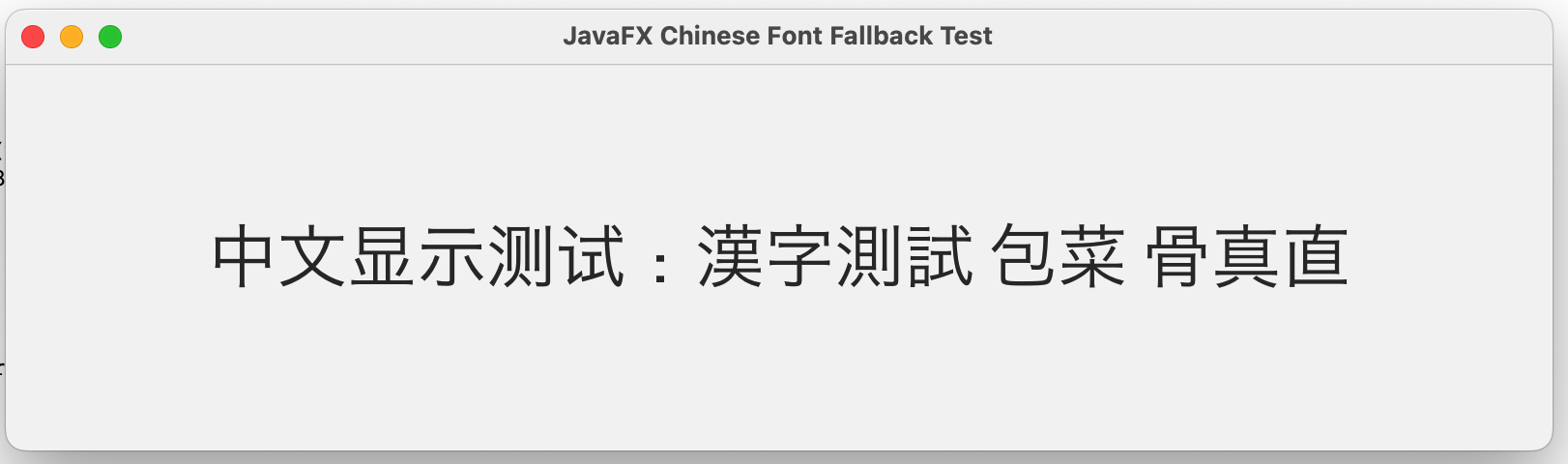
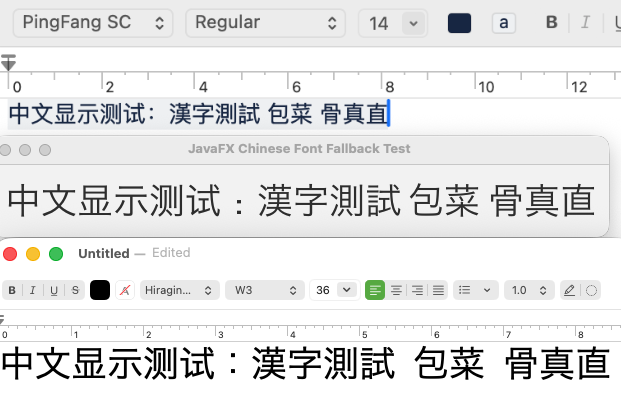
Because system Chinese fonts cannot be loaded, JavaFX falls back to Japanese fonts when rendering Chinese text. Although Chinese and Japanese share many Unicode code points, their glyph shapes differ significantly. The result is visually incorrect text and severely degraded readability for Chinese users.
This is not a subtle rendering issue. Large blocks of Chinese text appear with Japanese glyph forms, making the text look incorrect and unnatural.
In addition, Chinese locale variants such as Simplified Chinese, Traditional Chinese (Taiwan), and Traditional Chinese (Hong Kong) cannot be distinguished correctly. Modern macOS provides distinct system fonts for these variants and selects them using CoreText’s language-aware cascade, but JavaFX collapses all Chinese fallback into a Simplified Chinese–biased path and ignores CoreText’s locale-specific decisions.
⸻
Root cause
JavaFX lacks a FontResource abstraction that can represent native CoreText system fonts without relying on font files.
⸻
Why patching file paths is not viable
System font file paths are no longer stable on macOS. Apple is actively removing system fonts from the filesystem, and hard-coded paths will continue to break across OS releases. The file-based font model is fundamentally incompatible with CoreText’s design.
⸻
Apple-recommended approach
Apple recommends using CTFontRef and CTFontDescriptorRef as the primary font objects and querying glyph mapping, advances, outlines, bounding boxes, and fallback cascade directly through CoreText APIs. Direct parsing of system font files is explicitly discouraged.
On macOS, CoreText is the font system, and CTFontRef is the font.
⸻
Direction for a correct fix
A correct solution requires supporting a CoreText-native FontResource, allowing system fonts without file paths to participate in fallback, preserving CoreText’s cascade order, and keeping the existing CompositeFont and LogicalFont architecture intact. Changes should be limited to the FontResource layer and macOS-specific font discovery.
This aligns JavaFX with Apple’s CoreText design and with native font models used on other platforms.
⸻
Conclusion
The current macOS font implementation in JavaFX is based on an assumption that is no longer valid. As macOS evolves, continuing to rely on file-based system fonts leads to increasing breakage, particularly for Chinese users.
Supporting native CoreText font resources is necessary to restore correct Chinese font fallback behavior and ensure future compatibility.
STEPS TO FOLLOW TO REPRODUCE THE PROBLEM :
This issue can be reproduced on macOS 15 and later using JavaFX’s default font fallback behavior when rendering Chinese (CJK) text.
1. Install macOS 15 or later (including macOS 26).
2. Use a clean system with no third-party Chinese fonts installed.
3. Run a JavaFX application that:
Uses a logical font (e.g. default system font)
Renders Chinese text
4. Observe the rendered glyphs.
EXPECTED VERSUS ACTUAL BEHAVIOR :
EXPECTED -
1. JavaFX should select system Chinese fonts when rendering Chinese text.
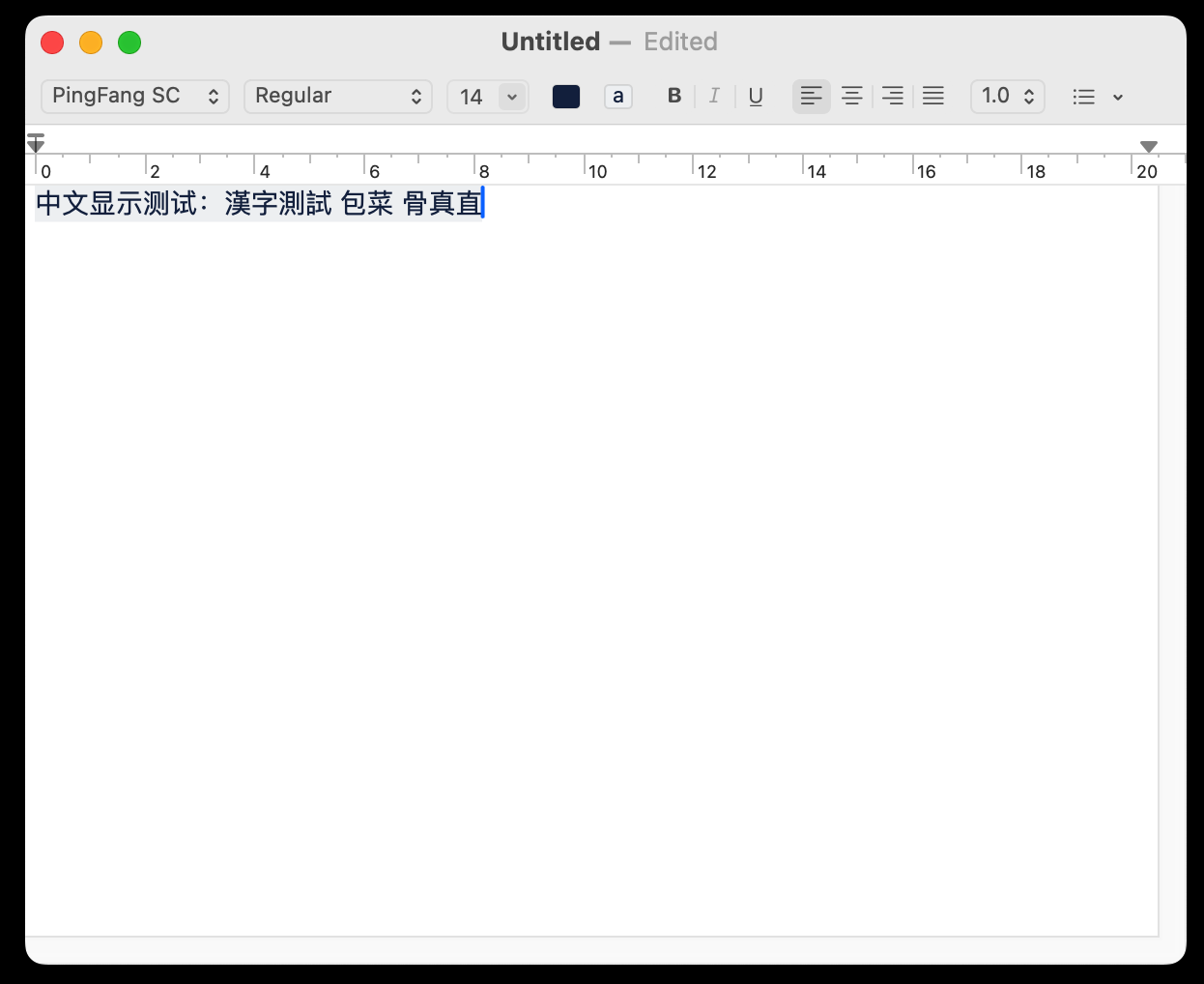
2. Chinese glyphs should visually match native macOS applications (TextEdit, Safari, etc.).
3. Font fallback should preserve language-appropriate glyph selection, following CoreText’s cascade.
4. Chinese text should not fall back to Japanese fonts.
ACTUAL -
On macOS 15 and later, JavaFX fails to load system Chinese fonts.
Chinese text is incorrectly rendered using Japanese fonts (e.g. Hiragino).
Although Chinese and Japanese share many Unicode code points, their glyph shapes differ significantly.
This results in:
Visually incorrect text
Severely degraded readability for Chinese users
The issue occurs silently, without errors or warnings.
Native macOS applications do not exhibit this problem.
---------- BEGIN SOURCE ----------
import javafx.application.Application;
import javafx.scene.Scene;
import javafx.scene.control.Label;
import javafx.scene.layout.StackPane;
import javafx.stage.Stage;
public class ChineseFontFallbackTest extends Application {
@Override
public void start(Stage stage) {
Label label = new Label("中文显示测试:漢字測試 包菜 骨真直");
label.setStyle("-fx-font-size: 36px;");
StackPane root = new StackPane(label);
Scene scene = new Scene(root, 800, 200);
stage.setTitle("JavaFX Chinese Font Fallback Test");
stage.setScene(scene);
stage.show();
}
public static void main(String[] args) {
launch(args);
}
}
---------- END SOURCE ----------
Operating System: macOS 15 and later (including macOS 26)
Architecture: Apple Silicon (ARM64) and Intel (x86_64)
Java Runtime: OpenJDK 25
JavaFX Version: JavaFX built from source
A DESCRIPTION OF THE PROBLEM :
File-based font model breaks CoreText cascade and causes incorrect CJK fallback (Chinese falls back to Japanese)
Summary
On macOS, JavaFX still relies on a file-based font model, assuming that every usable font has an accessible font file (.ttf/.ttc/.otf) that can be parsed via OpenType tables. This assumption is no longer valid on modern macOS.
Starting with macOS 15 and later, many system fonts, including all system Chinese fonts, no longer exist as accessible font files. These fonts are fully integrated into CoreText and are exposed only as native system fonts with names prefixed by a dot.
As a result, JavaFX breaks CoreText’s native fallback cascade and produces incorrect CJK fallback behavior. In practice, Chinese text is rendered using Japanese fonts instead of system Chinese fonts.
⸻
Background
JavaFX currently represents fonts on macOS primarily using PrismFontFile. This design assumes that each font has a readable file path and that font initialization can parse OpenType tables such as cmap, glyf, and hmtx from that file. Glyph availability is determined by inspecting the cmap table, and fallback fonts are instantiated as file-backed font resources.
This approach works for traditional third-party fonts but is incompatible with the modern macOS system font architecture.
⸻
Changes in macOS system fonts
Beginning with macOS 15, Apple significantly changed the system font architecture. Many core system fonts, including PingFang, the only system Chinese font family, have been removed from /System/Library/Fonts. These fonts no longer provide stable or accessible file paths and cannot be safely or legally parsed by applications.
System fonts are now exposed exclusively through CoreText and appear as native fonts with names prefixed by a dot, such as .AppleSimplifiedChineseFont-Regular, .AppleTraditionalChineseFont-Regular, .AppleHongKongChineseFont-Regular, and .AppleJapaneseFont-Regular.
Apple’s recommended usage model is to treat CTFontRef and CTFontDescriptorRef as authoritative font objects and to query all font capabilities through CoreText APIs, rather than parsing OpenType tables directly.
On modern macOS, font files are no longer a valid abstraction for system fonts.
⸻
Current JavaFX behavior
During font discovery and fallback, JavaFX currently skips fonts whose names begin with a dot and treats them as unusable. On macOS 15 and later, this effectively discards most system fonts, including all system Chinese fonts, even when CoreText has already computed a correct cascade list.
To compensate for earlier limitations, JavaFX hard-codes fallback font file paths for CJK fonts. This approach relied on paths such as /System/Library/Fonts/PingFang.ttc. However, these files no longer exist on macOS 15 and later, so the fallback logic silently fails.
⸻
User-visible impact
Because system Chinese fonts cannot be loaded, JavaFX falls back to Japanese fonts when rendering Chinese text. Although Chinese and Japanese share many Unicode code points, their glyph shapes differ significantly. The result is visually incorrect text and severely degraded readability for Chinese users.
This is not a subtle rendering issue. Large blocks of Chinese text appear with Japanese glyph forms, making the text look incorrect and unnatural.
In addition, Chinese locale variants such as Simplified Chinese, Traditional Chinese (Taiwan), and Traditional Chinese (Hong Kong) cannot be distinguished correctly. Modern macOS provides distinct system fonts for these variants and selects them using CoreText’s language-aware cascade, but JavaFX collapses all Chinese fallback into a Simplified Chinese–biased path and ignores CoreText’s locale-specific decisions.
⸻
Root cause
JavaFX lacks a FontResource abstraction that can represent native CoreText system fonts without relying on font files.
⸻
Why patching file paths is not viable
System font file paths are no longer stable on macOS. Apple is actively removing system fonts from the filesystem, and hard-coded paths will continue to break across OS releases. The file-based font model is fundamentally incompatible with CoreText’s design.
⸻
Apple-recommended approach
Apple recommends using CTFontRef and CTFontDescriptorRef as the primary font objects and querying glyph mapping, advances, outlines, bounding boxes, and fallback cascade directly through CoreText APIs. Direct parsing of system font files is explicitly discouraged.
On macOS, CoreText is the font system, and CTFontRef is the font.
⸻
Direction for a correct fix
A correct solution requires supporting a CoreText-native FontResource, allowing system fonts without file paths to participate in fallback, preserving CoreText’s cascade order, and keeping the existing CompositeFont and LogicalFont architecture intact. Changes should be limited to the FontResource layer and macOS-specific font discovery.
This aligns JavaFX with Apple’s CoreText design and with native font models used on other platforms.
⸻
Conclusion
The current macOS font implementation in JavaFX is based on an assumption that is no longer valid. As macOS evolves, continuing to rely on file-based system fonts leads to increasing breakage, particularly for Chinese users.
Supporting native CoreText font resources is necessary to restore correct Chinese font fallback behavior and ensure future compatibility.
STEPS TO FOLLOW TO REPRODUCE THE PROBLEM :
This issue can be reproduced on macOS 15 and later using JavaFX’s default font fallback behavior when rendering Chinese (CJK) text.
1. Install macOS 15 or later (including macOS 26).
2. Use a clean system with no third-party Chinese fonts installed.
3. Run a JavaFX application that:
Uses a logical font (e.g. default system font)
Renders Chinese text
4. Observe the rendered glyphs.
EXPECTED VERSUS ACTUAL BEHAVIOR :
EXPECTED -
1. JavaFX should select system Chinese fonts when rendering Chinese text.
2. Chinese glyphs should visually match native macOS applications (TextEdit, Safari, etc.).
3. Font fallback should preserve language-appropriate glyph selection, following CoreText’s cascade.
4. Chinese text should not fall back to Japanese fonts.
ACTUAL -
On macOS 15 and later, JavaFX fails to load system Chinese fonts.
Chinese text is incorrectly rendered using Japanese fonts (e.g. Hiragino).
Although Chinese and Japanese share many Unicode code points, their glyph shapes differ significantly.
This results in:
Visually incorrect text
Severely degraded readability for Chinese users
The issue occurs silently, without errors or warnings.
Native macOS applications do not exhibit this problem.
---------- BEGIN SOURCE ----------
import javafx.application.Application;
import javafx.scene.Scene;
import javafx.scene.control.Label;
import javafx.scene.layout.StackPane;
import javafx.stage.Stage;
public class ChineseFontFallbackTest extends Application {
@Override
public void start(Stage stage) {
Label label = new Label("中文显示测试:漢字測試 包菜 骨真直");
label.setStyle("-fx-font-size: 36px;");
StackPane root = new StackPane(label);
Scene scene = new Scene(root, 800, 200);
stage.setTitle("JavaFX Chinese Font Fallback Test");
stage.setScene(scene);
stage.show();
}
public static void main(String[] args) {
launch(args);
}
}
---------- END SOURCE ----------