ADDITIONAL SYSTEM INFORMATION :
Windows 11
openjdk version "25.0.1" 2025-10-21 LTS
OpenJDK Runtime Environment Corretto-25.0.1.8.1 (build 25.0.1+8-LTS)
OpenJDK 64-Bit Server VM Corretto-25.0.1.8.1 (build 25.0.1+8-LTS, mixed mode, sharing)
A DESCRIPTION OF THE PROBLEM :
I'm using custom control (Label) instead of standard cell to display a value in a column of TreeTableView. I have noticed, that when displayed value is 'null', the cell content is sometimes not showing. It seems the updateItem()-method of custom cell is not called properly under circumstances. See the minimal test case attached.
STEPS TO FOLLOW TO REPRODUCE THE PROBLEM :
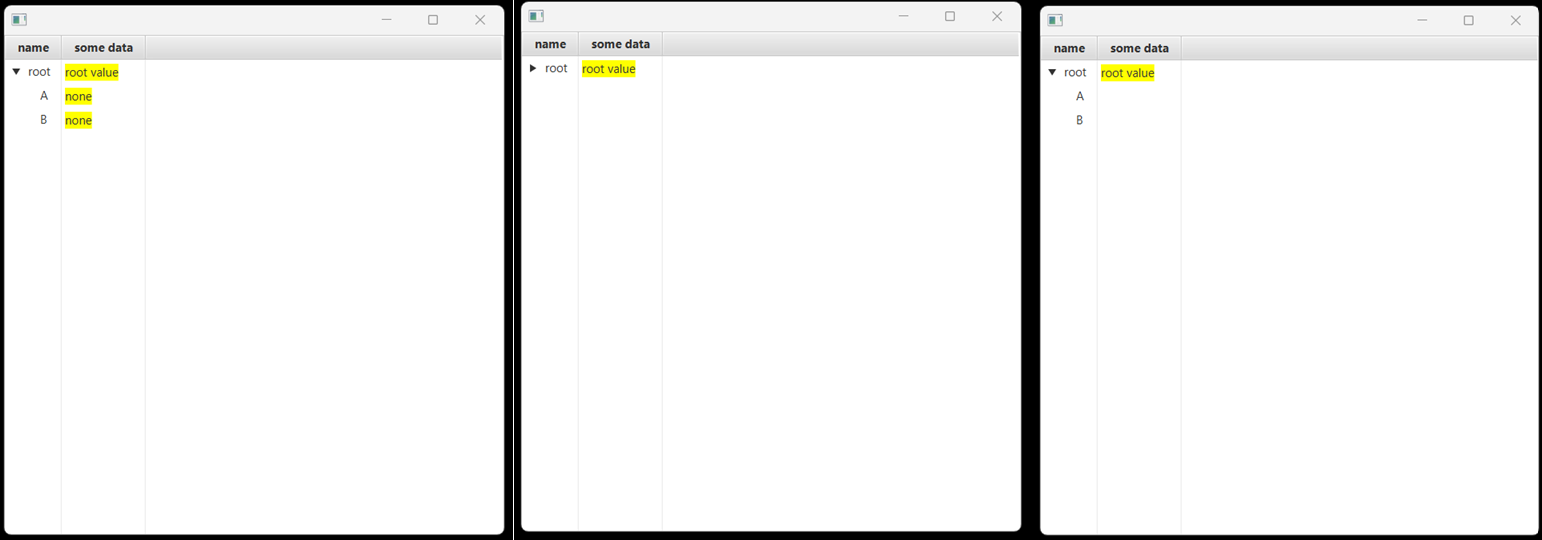
Start the program. You'll see something like that:
|name|someData|
|root|root value|
|A|none|
|B|none|
collapse/expand root node -> the 'none' of A and B are not displayed properly anymore:
|name|someData|
|root|root value|
|A||
|B||
EXPECTED VERSUS ACTUAL BEHAVIOR :
EXPECTED -
for non empty rows 'nulls' are displayed as text 'none'
ACTUAL -
after expanding the node, nulls are shown as unused cells.
---------- BEGIN SOURCE ----------
import javafx.application.Application;
import javafx.beans.property.SimpleStringProperty;
import javafx.scene.Scene;
import javafx.scene.control.*;
import javafx.scene.layout.Background;
import javafx.scene.layout.StackPane;
import javafx.scene.paint.Color;
import javafx.stage.Stage;
public class TreeTableBug extends Application {
public static void main(String[] args) {
TreeTableBug.launch(args);
}
@Override
public void start(Stage primaryStage) throws Exception {
TreeTableView<ItemPayload> table = new TreeTableView<>();
TreeTableColumn<ItemPayload, String> col1 = new TreeTableColumn<>("name");
col1.setCellValueFactory(v -> new SimpleStringProperty(v.getValue().getValue().name));
TreeTableColumn<ItemPayload, String> col2 = new TreeTableColumn<>("some data");
col2.setCellValueFactory(v -> new SimpleStringProperty(v.getValue().getValue().someData));
col2.setCellFactory(c -> new TreeTableCell<>() {
private Label customLabel = new Label();
{
customLabel.setBackground(Background.fill(Color.YELLOW));
}
@Override
protected void updateItem(String item, boolean empty) {
super.updateItem(item, empty);
if (empty) {
setGraphic(null);
} else {
this.customLabel.setText(item != null ? item : "none");
this.setGraphic(this.customLabel);
}
}
});
table.getColumns().addAll(col1, col2);
TreeItem<ItemPayload> rootItem = new TreeItem<>(new ItemPayload("root", "root value"));
rootItem.setExpanded(true);
rootItem.getChildren().addAll(
new TreeItem<>(new ItemPayload("A", null)),
new TreeItem<>(new ItemPayload("B", null))
);
table.setRoot(rootItem);
StackPane root = new StackPane();
root.getChildren().add(table);
primaryStage.setScene(new Scene(root, 500, 500));
primaryStage.show();
}
record ItemPayload(String name, String someData) {}
}
---------- END SOURCE ----------
Windows 11
openjdk version "25.0.1" 2025-10-21 LTS
OpenJDK Runtime Environment Corretto-25.0.1.8.1 (build 25.0.1+8-LTS)
OpenJDK 64-Bit Server VM Corretto-25.0.1.8.1 (build 25.0.1+8-LTS, mixed mode, sharing)
A DESCRIPTION OF THE PROBLEM :
I'm using custom control (Label) instead of standard cell to display a value in a column of TreeTableView. I have noticed, that when displayed value is 'null', the cell content is sometimes not showing. It seems the updateItem()-method of custom cell is not called properly under circumstances. See the minimal test case attached.
STEPS TO FOLLOW TO REPRODUCE THE PROBLEM :
Start the program. You'll see something like that:
|name|someData|
|root|root value|
|A|none|
|B|none|
collapse/expand root node -> the 'none' of A and B are not displayed properly anymore:
|name|someData|
|root|root value|
|A||
|B||
EXPECTED VERSUS ACTUAL BEHAVIOR :
EXPECTED -
for non empty rows 'nulls' are displayed as text 'none'
ACTUAL -
after expanding the node, nulls are shown as unused cells.
---------- BEGIN SOURCE ----------
import javafx.application.Application;
import javafx.beans.property.SimpleStringProperty;
import javafx.scene.Scene;
import javafx.scene.control.*;
import javafx.scene.layout.Background;
import javafx.scene.layout.StackPane;
import javafx.scene.paint.Color;
import javafx.stage.Stage;
public class TreeTableBug extends Application {
public static void main(String[] args) {
TreeTableBug.launch(args);
}
@Override
public void start(Stage primaryStage) throws Exception {
TreeTableView<ItemPayload> table = new TreeTableView<>();
TreeTableColumn<ItemPayload, String> col1 = new TreeTableColumn<>("name");
col1.setCellValueFactory(v -> new SimpleStringProperty(v.getValue().getValue().name));
TreeTableColumn<ItemPayload, String> col2 = new TreeTableColumn<>("some data");
col2.setCellValueFactory(v -> new SimpleStringProperty(v.getValue().getValue().someData));
col2.setCellFactory(c -> new TreeTableCell<>() {
private Label customLabel = new Label();
{
customLabel.setBackground(Background.fill(Color.YELLOW));
}
@Override
protected void updateItem(String item, boolean empty) {
super.updateItem(item, empty);
if (empty) {
setGraphic(null);
} else {
this.customLabel.setText(item != null ? item : "none");
this.setGraphic(this.customLabel);
}
}
});
table.getColumns().addAll(col1, col2);
TreeItem<ItemPayload> rootItem = new TreeItem<>(new ItemPayload("root", "root value"));
rootItem.setExpanded(true);
rootItem.getChildren().addAll(
new TreeItem<>(new ItemPayload("A", null)),
new TreeItem<>(new ItemPayload("B", null))
);
table.setRoot(rootItem);
StackPane root = new StackPane();
root.getChildren().add(table);
primaryStage.setScene(new Scene(root, 500, 500));
primaryStage.show();
}
record ItemPayload(String name, String someData) {}
}
---------- END SOURCE ----------
- relates to
-
JDK-8115233 ProgressBar cells are rendered after collapsing root
-

- Closed
-
-
-
- Closed
-