-
Type:
Bug
-
Resolution: Unresolved
-
Priority:
 P4
P4
-
None
-
Affects Version/s: 27
-
Component/s: client-libs
-
os_x
VoiceOver should be able to read Swing components with the appropriate language.
This came up in a VPAT review of our desktop Swing app when we present a list of languages.
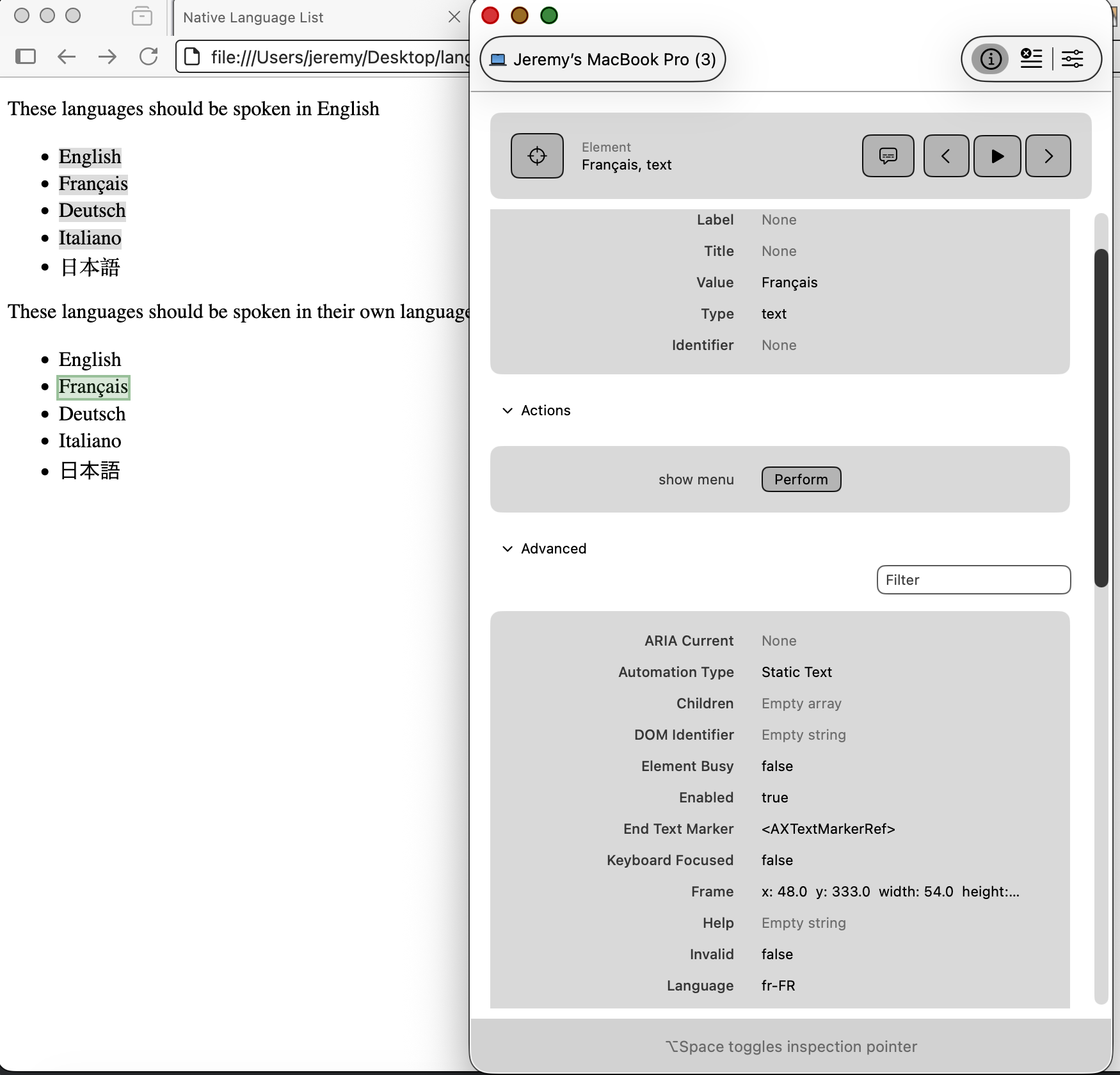
If a webpage specifies the language via the `lang` attribute (such as `<li lang="fr-FR">Français</li>`), then VoiceOver respects that attribute. I don't think there's any similar mechanism in Swing currently.
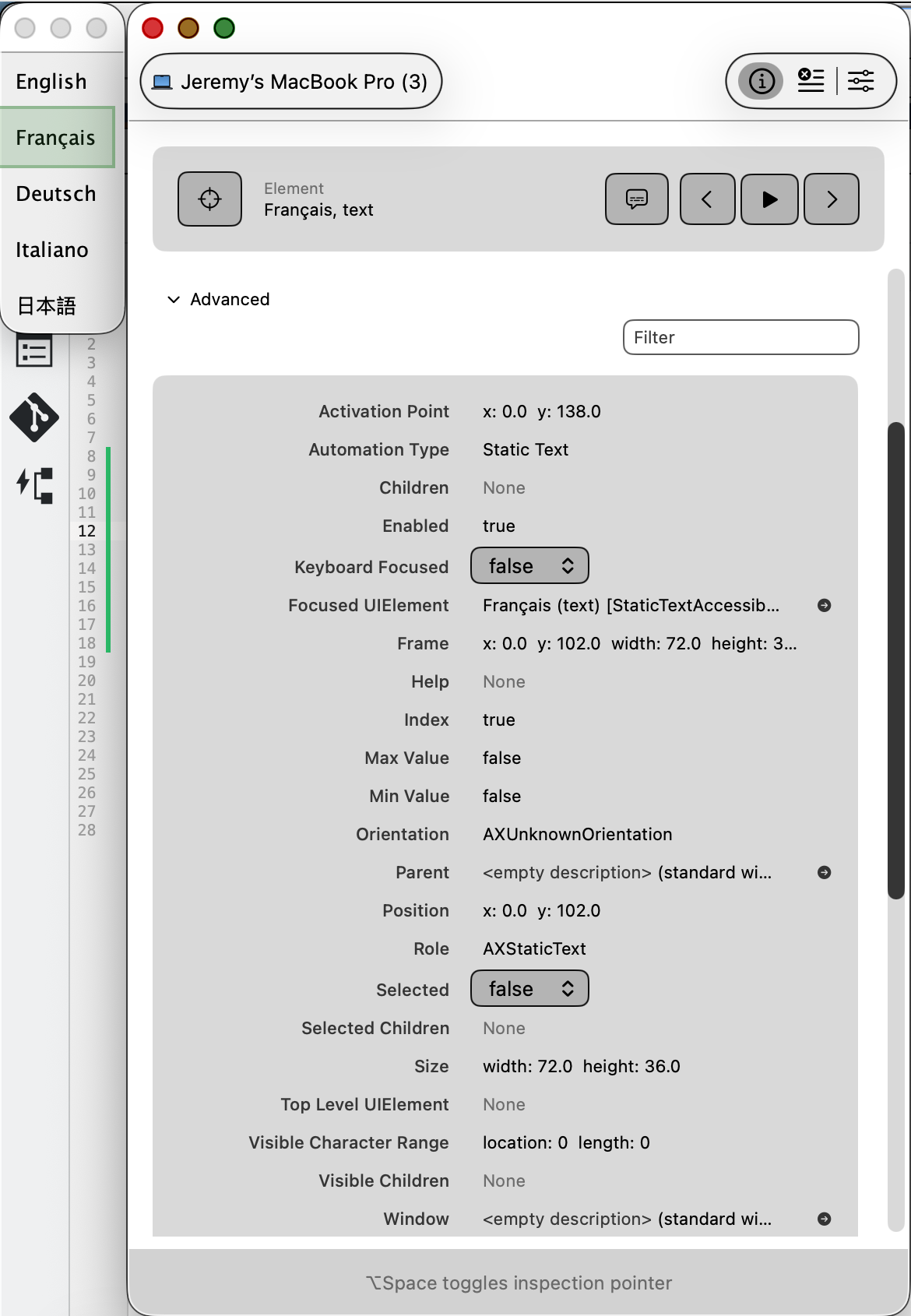
My ideal resolution would let VoiceOver / Accessibility Inspector identify the "Language" attribute based on `java.awt.Component.getLocale()`, but if there were any (reasonable) way to communicate this info the AX interfaces I'd be happy.
Sample code:
import javax.swing.*;
import javax.swing.border.EmptyBorder;
import java.awt.*;
import java.util.Locale;
/**
* Steps to reproduce:
* 1. Launch app
* 2. Turn on VoiceOver
* 3. Move the mouse over the non-English languages
*
* Observed behavior: VoiceOver reads them in an English-like accent.
* Expected behavior: VoiceOver should read them in an accent matching the language they describe.
*
* Alternatively / more specifically: use Apple's "Accessibility Inspector" app
* to inspect the JLabels. Observe no "Language" attribute is listed. However a
* "Language" attribute is listed if you use a browser with HTML resembling
* `<li lang="fr-FR">Français</li>`
*/
public class VoiceOverLanguageTest {
public static void main(String[] args) {
SwingUtilities.invokeLater(new Runnable() {
@Override
public void run() {
new VoiceOverLanguageTest();
}
});
}
public VoiceOverLanguageTest() {
JFrame f = new JFrame();
f.getContentPane().setLayout(
new BoxLayout(f.getContentPane(), BoxLayout.Y_AXIS));
addLanguage(f.getContentPane(), "English", Locale.ENGLISH);
addLanguage(f.getContentPane(), "Français", Locale.FRENCH);
addLanguage(f.getContentPane(), "Deutsch", Locale.GERMAN);
addLanguage(f.getContentPane(), "Italiano", Locale.ITALIAN);
addLanguage(f.getContentPane(), "日本語", Locale.JAPANESE);
f.pack();
f.setVisible(true);
}
private void addLanguage(Container container, String str, Locale locale) {
JLabel label = new JLabel(str);
label.setBorder(new EmptyBorder(10,10,10,10));
label.setLocale(locale);
container.add(label);
}
}
This came up in a VPAT review of our desktop Swing app when we present a list of languages.
If a webpage specifies the language via the `lang` attribute (such as `<li lang="fr-FR">Français</li>`), then VoiceOver respects that attribute. I don't think there's any similar mechanism in Swing currently.
My ideal resolution would let VoiceOver / Accessibility Inspector identify the "Language" attribute based on `java.awt.Component.getLocale()`, but if there were any (reasonable) way to communicate this info the AX interfaces I'd be happy.
Sample code:
import javax.swing.*;
import javax.swing.border.EmptyBorder;
import java.awt.*;
import java.util.Locale;
/**
* Steps to reproduce:
* 1. Launch app
* 2. Turn on VoiceOver
* 3. Move the mouse over the non-English languages
*
* Observed behavior: VoiceOver reads them in an English-like accent.
* Expected behavior: VoiceOver should read them in an accent matching the language they describe.
*
* Alternatively / more specifically: use Apple's "Accessibility Inspector" app
* to inspect the JLabels. Observe no "Language" attribute is listed. However a
* "Language" attribute is listed if you use a browser with HTML resembling
* `<li lang="fr-FR">Français</li>`
*/
public class VoiceOverLanguageTest {
public static void main(String[] args) {
SwingUtilities.invokeLater(new Runnable() {
@Override
public void run() {
new VoiceOverLanguageTest();
}
});
}
public VoiceOverLanguageTest() {
JFrame f = new JFrame();
f.getContentPane().setLayout(
new BoxLayout(f.getContentPane(), BoxLayout.Y_AXIS));
addLanguage(f.getContentPane(), "English", Locale.ENGLISH);
addLanguage(f.getContentPane(), "Français", Locale.FRENCH);
addLanguage(f.getContentPane(), "Deutsch", Locale.GERMAN);
addLanguage(f.getContentPane(), "Italiano", Locale.ITALIAN);
addLanguage(f.getContentPane(), "日本語", Locale.JAPANESE);
f.pack();
f.setVisible(true);
}
private void addLanguage(Container container, String str, Locale locale) {
JLabel label = new JLabel(str);
label.setBorder(new EmptyBorder(10,10,10,10));
label.setLocale(locale);
container.add(label);
}
}